Impact Score: 5/10
Prisma 6.12.0 — Release Notes & Engineering Impact
Source available — automated, not human-reviewed
Component: prisma · Channel: stable. Automated analysis, not a compatibility certification. How this works.
Analysis updated: 2026-11-01.
⚡ Executive Summary (TL;DR)
Prisma 6.12.0. Source highlight: Today, we are excited to share the `6.12.0` stable release 🎉
Who Does This Impact? (Role-Based Analysis)
💻 Software Engineers & Devs
Check the source notes against the package and APIs you use before upgrading.
📊 Product & Engineering Leads
Use the documented changes to assess relevance to your product; release frequency alone is not a quality measure.
⚙️ DevOps & Security
Verify the target version, runtime requirements and rollback procedure in the official documentation.
📄 View Raw Release Notes (Original Developer Log)
Today, we are excited to share the `6.12.0` stable release 🎉
**🌟 Star this repo for notifications about new releases, bug fixes & features — or [follow us on X](https://pris.ly/x)!**
## Highlights
### ESM-compatible `prisma-client` generator now in Preview
We’re excited to share that our new and more flexible `prisma-client` generator is moving into [Preview](https://www.prisma.io/docs/orm/more/releases#preview)! As a reminder, here’s what it looks like:
```prisma
generator client {
// Required
provider = "prisma-client" // no `-js` at the end!
output = "../src/generated/prisma"
// Optional
runtime = "nodejs"
moduleFormat = "esm"
generatedFileExtension = "ts"
importFileExtension = "ts"
}
```
This new generator eliminates any headaches that you may have experienced due to [magical code generation into `node_modules`](https://www.prisma.io/blog/why-prisma-orm-generates-code-into-node-modules-and-why-it-ll-change) and gives you full control over the generated Prisma Client code. With it moving into Preview, we hope that even more of you will try it out and share your feedback with us!
> **Note**: The `prisma-client` generator will become the default in Prisma v7, replacing the current `prisma-client-js` generator.
In addition to moving it into Preview, we also created a couple of new ready-to-run examples to help you get started with the new generator and your favorite framework:
- [React Router + Vite + Cloudflare](https://github.com/prisma/prisma-examples/tree/latest/generator-prisma-client/react-router-starter-cloudflare-workerd)
- [React Router + Vite + Node.js](https://github.com/prisma/prisma-examples/tree/latest/generator-prisma-client/react-router-starter-nodejs)
- [Nuxt 3 + Vite + Nitro](https://github.com/prisma/prisma-examples/tree/latest/generator-prisma-client/nuxt3-starter-nodejs)
- [Deno Deploy](https://github.com/prisma/prisma-examples/tree/latest/generator-prisma-client/deno-deploy)
📚 Learn more in the [docs](https://www.prisma.io/docs/orm/prisma-schema/overview/generators#prisma-client-preview).
### Specify `views` and `migrations` folder locations in `prisma.config.ts` (Early Access)
As we’re getting closer to the [General Availability](https://www.prisma.io/docs/orm/more/releases#generally-available-ga) release of [`prisma.config.ts`](https://www.prisma.io/docs/orm/reference/prisma-config-reference), we’re adding more capabilities to it. In previous versions, the Prisma CLI implicitly used to infer the location for migration and SQL view definition files based on the location of the Prisma schema. In this release, we’re adding two new fields (`migrations` and `views`) to give you more flexibility and clarity on how to locate these files:
```ts
// prisma.config.ts
export default defineConfig({
earlyAccess: true,
migrations: {
path: './db/migrations'
},
views: {
path: './db/views'
}
// ...
})
```
📚 Learn more in the [docs](https://www.prisma.io/docs/orm/reference/prisma-config-reference).
<!--
## Other news
### Manage Prisma Postgres programmatically via an API
Whether you need a way to quickly provision a Prisma Postgres instance in your CI/CD workflows, want to attach a fresh database to a preview branch of your app or even want to offer Prisma Postgres to your own users—our new Management API has you covered!
It’s shaped as a familiar REST API so you can programmatically take care of your database workflows: Provision or delete Prisma Postgres instances, retrieve or create connection strings and manage entire projects in [Prisma Console](https://console.prisma.io).
📚 Learn more in the [docs](https://www.prisma.io/docs/postgres/database/api-reference/management-api).
### New navigation UI for Prisma Console
The [Prisma Console](https://console.prisma.io) got a little makeover, including a new design for navigating and managing your projects and their databases. This makes common workflows like _creating new projects_, _navigating between projects and databases_, as well as _accessing project settings_ a lot more smooth:
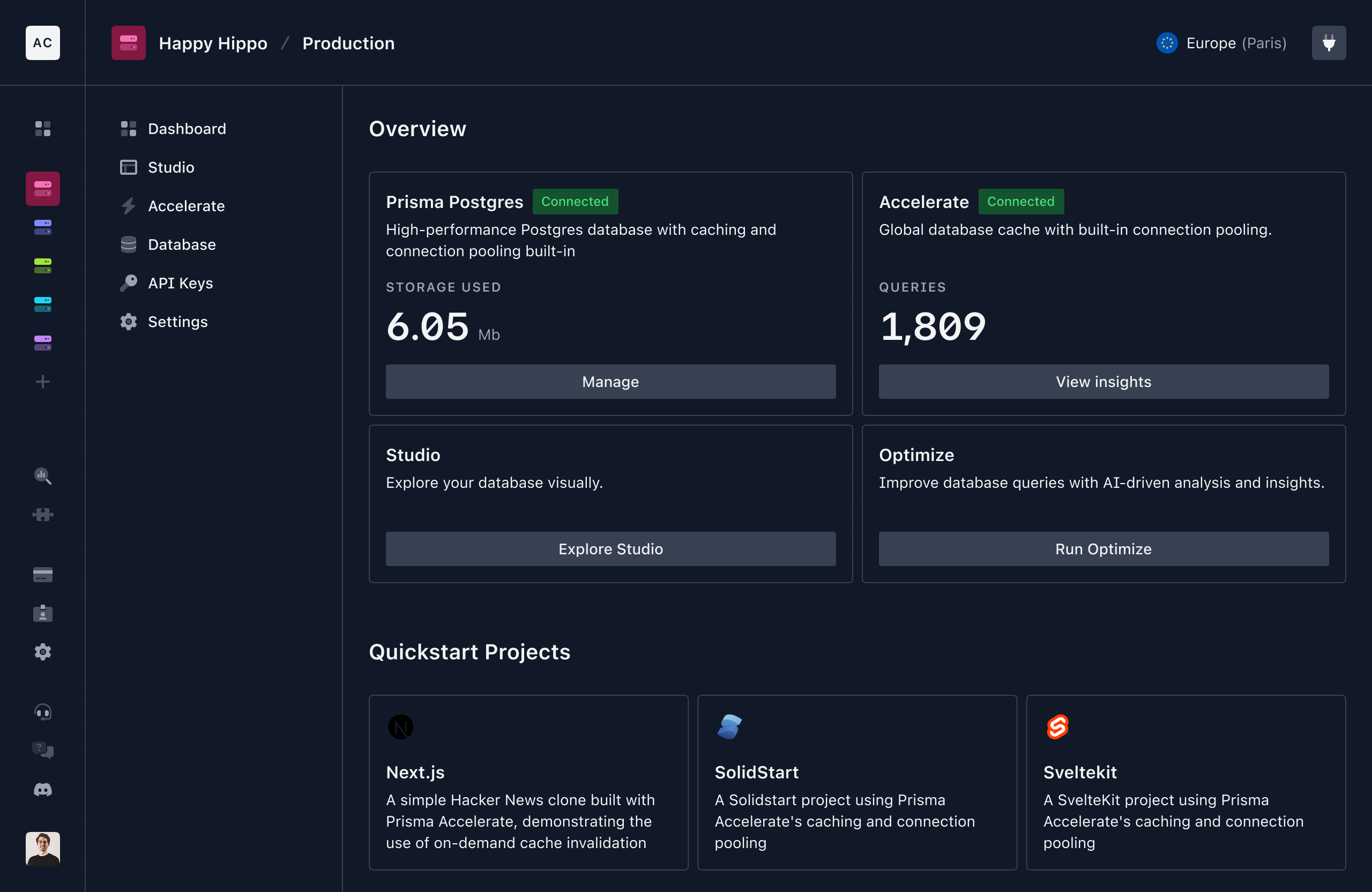
We’re eager to hear your feedback, [let us know on X](https://pris.ly/x) what you think of the new UI!
-->
## Enterprise support
Thousands of teams use Prisma and many of them already tap into our Enterprise & Agency Support Program for hands-on help with everything from schema integrations and performance tuning to security and compliance. With this program you also get priority issue triage and bug fixes, expert scalability advice, and custom training so that your Prisma-powered apps stay rock-solid at any scale. Learn more or join: [https://prisma.io/enterprise](https://prisma.io/enterprise)