Impact Score: 5/10
Prisma 6.9.0 — Release Notes & Engineering Impact
Source available — automated, not human-reviewed
Component: prisma · Channel: stable. Automated analysis, not a compatibility certification. How this works.
Analysis updated: 2026-11-01.
⚡ Executive Summary (TL;DR)
Prisma 6.9.0. Source highlight: Today, we are excited to share the `6.9.0` stable release 🎉
Who Does This Impact? (Role-Based Analysis)
💻 Software Engineers & Devs
Check the source notes against the package and APIs you use before upgrading.
📊 Product & Engineering Leads
Use the documented changes to assess relevance to your product; release frequency alone is not a quality measure.
⚙️ DevOps & Security
Verify the target version, runtime requirements and rollback procedure in the official documentation.
⚡ Performance & Enhancements (3)
- Persists your databases across `prisma dev` invocations.
- Enables you to have multiple local Prisma Postgres instances running at the same time.
- Running `prisma init` now uses local Prisma Postgres by default.
📄 View Raw Release Notes (Original Developer Log)
Today, we are excited to share the `6.9.0` stable release 🎉
🌟 **Help us spread the word about Prisma by starring the repo ☝️ or [posting on X](https://twitter.com/intent/tweet?text=Check%20out%20the%20latest%20@prisma%20release%20v6.9.0%20%F0%9F%9A%80%0D%0A%0D%0Ahttps://github.com/prisma/prisma/releases/tag/6.9.0) about the release.**
## Highlights
### Prisma ORM without Rust engines for PostgreSQL & SQLite (Preview)
If you've been excited about our work of removing the Rust engines from Prisma ORM but hesitated trying it out because it was in an [Early Access](https://www.prisma.io/docs/orm/more/releases#early-access) (EA) phase, now is a great time for you to get your hands on the [Rust-free Prisma ORM version](https://www.prisma.io/blog/try-the-new-rust-free-version-of-prisma-orm-early-access).
This major architectural change has moved from EA into [Preview](https://www.prisma.io/docs/orm/more/releases#preview) in this release, meaning there are no more know major issues. If you want to try it out, add the `queryCompiler` and `driverAdapters` preview feature flags to your `generator`, install the driver adapter for your database, and get going:
```prisma
generator client {
provider = "prisma-client-js"
previewFeatures = ["queryCompiler", "driverAdapters"]
output = "../generated/prisma"
}
```
Now run `prisma generate` to re-generate Prisma Client. If you didn't use a [driver adapter](https://www.prisma.io/docs/orm/overview/databases/database-drivers#driver-adapters) before, you'll need to install, e.g. the one for PostgreSQL:
```
npm install @prisma/adapter-pg
```
Once installed, you can instantiate `PrismaClient` as follows:
```ts
import { PrismaClient } from './generated/prisma'
import { PrismaPg } from '@prisma/adapter-pg'
const adapter = new PrismaPg({ connectionString: env.DATABASE_URL })
const prisma = new PrismaClient({ adapter })
```
No more hassle with query engines, binary targets and an even smoother experience in serverless and edge environments!
📚 Learn more in the [docs](https://www.prisma.io/docs/orm/prisma-client/setup-and-configuration/no-rust-engine).
### Major improvements for local Prisma Postgres (Preview)
In the last release, we enabled you to spin up a Prisma Postgres instance locally via the new `prisma dev` command. [Local Prisma Postgres](https://www.prisma.io/blog/prisma-6-8-0-release#local-development-for-prisma-postgres-early-access) uses PGlite under the hood and gives you an identical experience as you get with a remote Prisma Postgres instance.
This release brings major improvements to this feature:
- Persists your databases across `prisma dev` invocations.
- Enables you to have multiple local Prisma Postgres instances running at the same time.
- Running `prisma init` now uses local Prisma Postgres by default.
Try it out and let us know what you think!
📚 Learn more in the [docs](https://www.prisma.io/docs/postgres/database/local-development).
## More news
### Connect to Prisma Postgres with any ORM (Preview)
Since its [GA release](https://www.prisma.io/blog/prisma-postgres-the-future-of-serverless-databases), you could only interact with Prisma Postgres using Prisma ORM via a [custom connection string](https://www.prisma.io/docs/orm/reference/connection-urls#prisma-postgres).
This has changed now: When setting up a new Prisma Postgres instance, you receive a regular PostgreSQL direct TCP connection string (starting with `postgres://...`) that lets you connect to it using your favorite tool or database library, including Drizzle, Kysely, TypeORM, and others.
If you want to access Prisma Postgres from a serverless environment, you can also use our new [serverless driver](https://www.prisma.io/docs/postgres/database/serverless-driver) (Early Access).
📚 Learn more in the [docs](https://www.prisma.io/docs/postgres/database/direct-connections).
### Automated backup & restore
Prisma Postgres' backup and restore mechanism has seen a major upgrade recently: You can now easily restore any previous backup via the UI in the Prisma Console. Find the new **Backups** tab when viewing your database and select any backup from the list to restore its state to a previous point in time.
📚 Learn more in the [docs](https://www.prisma.io/docs/postgres/database/backups).
### Prisma's VS Code extension now has a UI to manage Prisma Postgres
If you're using Prisma ORM, chances are that you're using our [VS Code extension](https://marketplace.visualstudio.com/items?itemName=Prisma.prisma) too. In its latest release, we've added a major new capability to it: A UI for managing databases.
With this new UI, you can:
- Authenticate with the [Prisma Console](https://console.prisma.io)
- Create and delete remote Prisma Postgres instances
- View local Prisma Postgres instances
- View and edit data via an embedded Prisma Studio
- Visualize your database schema
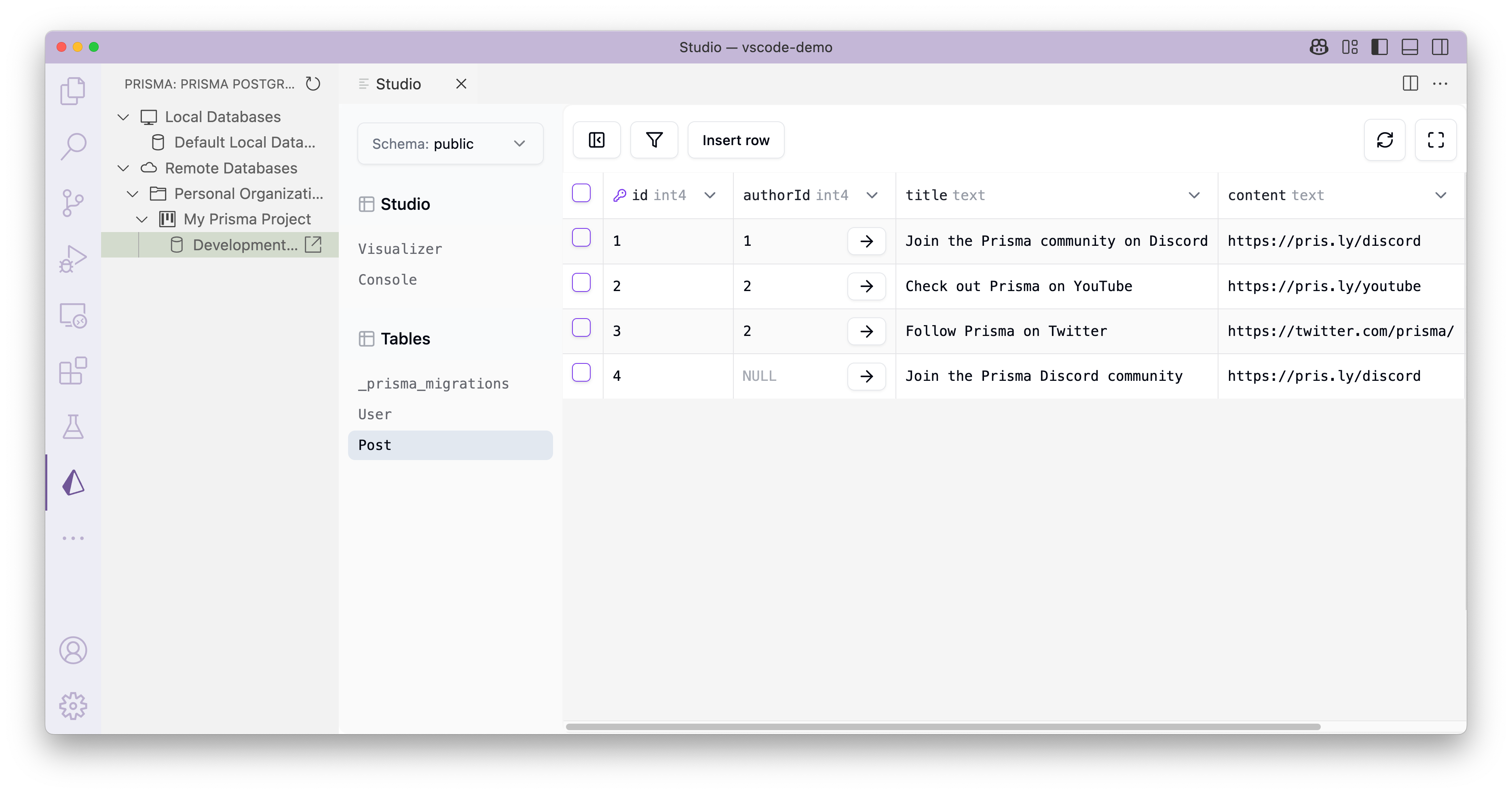
To use the new features, make sure to have the latest version of the Prisma VS Code extension installed and look out for the new **Prisma logo** in VS Code's _Activity Bar_.
📚 Learn more in the [docs](https://www.prisma.io/docs/postgres/integrations/vscode-extension#database-management-ui).
### New region for Prisma Postgres: San Francisco (`us-west-1`)
We keep expanding Prisma Postgres availability across the globe! After having added Singapore just a few weeks ago, we're now adding San Francisco based on another [poll we ran on X](https://x.com/prisma/status/1924494260910612841). Here are all the regions where you can spin up Prisma Postgres instances today:
- **`us-west-1`: San Francisco (_new!_)**
- `us-east-1`: North Virginia
- `eu-west-3`: Paris
- `ap-northeast-1`: Tokyo
- `ap-southeast-1`: Singapore
[Keep an eye on our X account](https://pris.ly/x) to take part in the poll and vote for the next availability zone of Prisma Postgres!